
Good audio makes your videos feel professional, keeps viewers watching, and separates you from the millions of creators using phone mics. You don’t need an expensive studio setup to get started. This list focuses on affordable, easy-to-use microphones that give clear voice capture, minimal background noise, and simple setup so you can focus on creating.
Whether you want plug-and-play USB simplicity or an XLR option that can grow with your setup, these picks help you improve production value without breaking your budget.
Top Picks
| Category | Product | Price | Score |
|---|---|---|---|
| 🏆 Best Overall | FIFINE AM8T XLR/USB Gaming Microphone Set | $67.99 | 90/100 |
| 💰 Best Value | COCONISE ME6S USB Gaming Microphone | $19.99 | 78/100 |
| 🎯 Best for Beginners | ZealSound K66 USB Microphone | $32.95 | 83/100 |
| ⚡ Best Performance | HyperX SoloCast USB Condenser Microphone | $48.00 | 89/100 |
| 💡 Best Innovation | MAONO GamerWave DGM20S USB Microphone | $38.23 | 86/100 |
How We Picked These Mics
You want a mic that improves your videos without adding technical headaches. We prioritized: sound quality (clarity and background-noise control); ease of use (plug-and-play or minimal setup); connectivity (USB for simplicity, XLR for upgrade paths); included accessories (stands, pop filters, boom arms); real-user feedback (ratings and common review points); and value for money so you get the best performance at each price point.
We also considered build quality and features like mute, headphone monitoring, and onboard gain control because those affect your recording workflow.
FIFINE AM8T

If you’re starting a YouTube channel and want decent sound without getting lost in gear, this FIFINE AM8T kit is a really practical starter. You get a dynamic mic that works via USB for plug-and-play simplicity and an XLR port if you later want to move into a more professional setup.
It includes a boom arm and desk clamp so you can position the mic without buying extra accessories, and the on-mic gain, mute button and headphone jack make monitoring live takes simple. The RGB lighting is a nice touch if you like a setup that looks as good on camera as it sounds.
For everyday use it handles meetings, streaming, and quick voiceovers with clear, warm vocals; for special occasions like interviews or a small live stream it gives a presentable, focused sound. If you want an easy upgrade from basic headset mics without a steep learning curve, this is a sensible choice you can grow with.
What People Say
People say it’s an easy upgrade from headset mics: clear, warm vocal capture, simple setup, and useful on-mic controls, though keyboard noise can show up if you’re too close.
Overall Sentiment: Positive

🗣️ Dr. Fishopolis
This mic was plug-and-play via USB-C and sounded great right away. The reviewer was surprised at how solid the build felt and appreciated that it also has an XLR jack if you ever upgrade. They noted it picked up keyboard clicks at close range and recommended pairing with noise-filtering software like NVIDIA Broadcast to tame background noise.
🗣️ Brad R
Worked seamlessly for work calls and office use with clear, crisp sound. The reviewer liked the sturdy feel of the mic, the headphone monitoring and volume controls, and the RGB color options. They mentioned the included stand is functional even if a bit light, and to watch the mute button when repositioning the mic.
Situational Uses
| Situation | How It Helps |
|---|---|
| Live Streaming | The boom arm and cardioid pattern keep your voice front-and-center while RGB lighting makes the setup look cohesive on camera. |
| Podcasting / Voiceovers | Warm, focused vocal tone and headphone monitoring help you check levels in real time for cleaner takes. |
| Work Calls & Meetings | Plug-and-play USB means you can jump into calls quickly with noticeably clearer audio than laptop mics. |
| Casual Gaming | Dynamic pickup reduces distant noise and the mic’s size/positioning options make it easy to keep out of the way while staying audible. |
Ease Of Use
| Feature | Ease Level |
|---|---|
| USB Setup | Easy |
| Switching to XLR (requires interface) | Moderate |
| On-mic gain/mute and headphone monitoring | Easy |
| Boom arm positioning and clamp | Easy |
Practicality
This kit is built for convenience: you get mic, boom arm, clamp and cables in one box so you can set up quickly at a desk. It’s compact enough for small spaces and durable enough for daily repositioning.
Problem Solving Ability
It improves vocal clarity over built-in mics and headsets and reduces distant room noise thanks to the dynamic/cardioid design; for close-up keyboard noise you can pair it with noise-reduction software like NVIDIA Broadcast.
Key Benefits
- USB plug-and-play plus XLR option for future upgrades
- Included boom arm and clamp so you don’t need extra accessories
- On-mic controls: gain, mute and headphone monitoring
- Cardioid/dynamic design that focuses on your voice and reduces room noise
- Customizable RGB for a polished on-camera look
Rating: 4.5 (total: 2099+)
COCONISE ME6S

If you want a simple upgrade from your laptop or headset mic, this COCONISE USB condenser is exactly the kind of starter mic that makes recording and streaming less fiddly. You get a plug-and-play setup, a metal desktop stand, pop filter and shock mount so your voice sounds clearer and keyboard thumps are less obvious.
The RGB lights give your setup some personality and the touch mute plus rotating gain control make it easy to adjust on the fly. For everyday use it’s great for calls, quick voiceovers and live streams; for special occasions like a recorded podcast or a longer YouTube shoot it gives you a noticeably cleaner, more focused vocal. If you want something that just works and doesn’t require a bunch of extra gear, this is a practical pick you can set up in minutes.
What People Say
Users report clear, usable audio straight away, praise the easy setup and accessories, and appreciate the mute and gain controls; a few mention durability concerns after extended use.
Overall Sentiment: Positive

🗣️ A
Reviewer A said it felt well-built out of the box and was truly plug-and-play. They noticed crisp, clear sound compared with their old mic, liked the convenient mute button and RGB lighting, and appreciated the shock mount and pop filter for reducing background noise. The rotating gain made quick level tweaks easy during sessions.
🗣️ Jay
Jay found the sound quality better than expected and praised the sturdy metal base and solid pop filter. They noted the cardioid pickup is ideal for solo recordings, that setup was simple, and that post-processing can yield surprisingly professional results when you pair the mic with basic editing.
Situational Uses
| Situation | How It Helps |
|---|---|
| Live Streaming | The mic keeps your voice front-and-center while the RGB lighting ties into your gaming setup so you don’t need extra flair on camera. |
| Podcasting / Voiceovers | The cardioid pickup and pop filter help you capture focused, plosive-reduced vocals that are easier to clean up in editing. |
| Work Calls & Meetings | Plug-and-play USB means you can hop into meetings with clearer audio than a laptop mic, and the mute touch keeps surprises to a minimum. |
| Casual Gaming | The weighted metal base and shock mount reduce knocks and desk vibration so your teammates hear you without keyboard clatter. |
Ease Of Use
| Feature | Ease Level |
|---|---|
| USB Plug-and-Play | Easy |
| On-mic touch mute and gain knob | Easy |
| Setting up tripod, pop filter and shock mount | Easy |
| Using with consoles (PS4/PS5) and PC | Moderate |
Practicality
This mic bundles the basics you’ll actually use: a sturdy stand, pop filter, shock mount and an accessible mute and gain control. It’s designed so you can clear up your audio without buying extra accessories or learning complex audio routing.
Problem Solving Ability
It noticeably improves vocal clarity over built-in mics and helps cut side noise thanks to its cardioid behavior and included accessories. If you have very heavy keyboard noise or need multi-person pickup, you may still need placement tweaks or extra sound treatment.
Key Benefits
- Plug-and-play USB setup so you can start recording quickly
- Included tripod, pop filter and shock mount reduce unwanted noise
- Touch mute and rotating gain let you control levels without opening software
- Cardioid-style pickup focuses on your voice for clearer solo recordings
- RGB indicator and solid metal base make it stable and camera-friendly
Rating: 4.3 (total: 3065+)
ZealSound USB Microphone (K66 Series)

If you’re starting a YouTube channel or improving your setup, this ZealSound USB mic is shockingly straightforward. You just plug it in (Type-C or the included iPhone adapter), tweak the gain and headphone level, and you’re ready to record or live-stream.
It’s top-addressed, has live monitoring through a 3.5 mm jack, and a solid metal stand so you don’t have to worry about wobble while you film.
What People Say
Users keep saying it’s easy to set up and noticeably improves voice clarity compared with phone mics. People love the monitoring jack, the gain control and the mute button — and support seems responsive if you run into problems.
Overall Sentiment: Positive

When You’ll Use It
| Situation | How It Helps |
|---|---|
| Recording voiceovers or sit-down videos | The cardioid pattern and gain knob let you capture clean, focused vocals with less room noise, so your voice comes through clearly on camera. |
| Live streaming or gaming | You get real-time headphone monitoring and quick mute/volume controls so you can manage your audio mid-stream without interrupting the show. |
| Singing or music covers | The mic handles higher SPLs and has an echo control, so you can tweak presence and avoid distortion by adjusting distance and gain. |
| Mobile content creation | Included iPhone and Type‑C adapters mean you can plug into phones or tablets and instantly upgrade audio for on-the-go filming. |
Ease of Use
| Feature | Ease Level |
|---|---|
| Setup (connectors & adapters) | Easy |
| On-device controls (gain, mute, echo) | Easy |
| Monitoring via headphone jack | Easy |
| Mounting/positioning (top-addressed, metal base) | Moderate |
Practicality
This mic is practical for creators who want better sound without complex setups. The metal base, multiple adapters and foam windscreen mean you can use it across devices and locations without hunting for extras.
How It Solves Common Starter Problems
It directly solves the ‘muddy phone audio’ problem and gives you monitoring and gain control to manage room noise and distortion. A few users noted missing accessories on rare occasions, but most report fast customer support.
Key Benefits
- Plug-and-play setup so you can start recording quickly without drivers
- On-device gain, echo and mute controls give you hands-on control while filming
- Headphone output for real-time, latency-free monitoring
- Top-addressed design and cardioid pattern that reduce background noise
Rating: 4.4 (total: 5163+)
HyperX SoloCast

If you’re starting a YouTube channel this October and want something that just works, the HyperX SoloCast is one of those straight-to-the-point mics you can trust. You plug it in via USB-C, point it toward your mouth and you’re ready to record or stream — no drivers, no fuss.
It’s compact so it won’t eat your desk space, and the tap-to-mute sensor with LED makes it easy to quiet yourself on the fly. Use it for everyday voiceovers, casual livestreams, or quick reaction videos, and you can also mount it to a boom arm when you want a cleaner studio look for special shoots.
People often pair it with a simple pop filter if they notice plosives, but out of the box it gives noticeably clearer voice capture than headset mics. If you want an easy upgrade that won’t slow you down, this is a sensible pick.
What People Say
You’ll hear users praise the SoloCast for its simplicity: it’s easy to set up, improves voice clarity over headset mics, and the tap-to-mute is handy during live sessions. A few people note you might want a pop filter or small adjustments to handle room noise.
Overall Sentiment: Positive

🗣️ FARHANA AHMED
This microphone is an absolute game-changer for anyone looking for top-notch audio quality without breaking the bank. I was impressed by how easy it was to set up. The sound quality is exceptional, capturing crisp vocals making it perfect for streaming, podcasting, or even casual gaming. I love the compact design, which fits seamlessly on my desk, and the adjustable stand is a great bonus for customizing the angle. The tap-to-mute sensor on top is a thoughtful feature, especially for streamers who need quick and silent muting.
🗣️ Raven
Wanted to start making videos and my headset mic wasn’t cutting it. Set up is easy, just take out of the box and hook up to the PC via USB. The quality of sound is really good, it picks up sound so well I had to put a filter on to keep out the AC noise. It’s not that hyper clear super close up warm sound you get with high end mics, but this is perfectly fine quality for most hobbyists.
When You’ll Use It
| Situation | How It Helps |
|---|---|
| Recording voiceovers and sit-down videos | The mic captures clear, focused vocals so your narration sounds professional without complicated audio chains. |
| Live streaming and gaming | Quick tap-to-mute and a visible LED let you manage interruptions smoothly while keeping your stream running. |
| Online meetings and Discord chats | Plug-and-play setup means you can join calls with better audio quality fast, and the compact footprint fits crowded desks. |
| Occasional console capture (PS4/PS5) | It’s compatible with consoles and works right away for streamers who switch between PC and console setups. |
Ease of Use
| Feature | Ease Level |
|---|---|
| Setup (USB-C plug-and-play) | Easy |
| Tap-to-mute sensor and LED status | Easy |
| Mounting (desk stand and boom arm threads) | Moderate |
| Software/configuration | Easy |
Practicality
This mic is practical if you want better audio quickly. It works well on small desks, fits under monitors, and can be mounted later if you upgrade your setup.
You might add a pop filter for plosive control, but otherwise it’s ready for daily content creation.
How It Solves Common Starter Problems
It solves the ‘thin headset audio’ problem by offering clearer, more focused voice capture with minimal setup. Some users mention it picks up room noise unless you use a filter or adjust placement, but those are easy fixes.
Key Benefits
- Plug-and-play USB-C connection so you can record without drivers
- Tap-to-mute sensor with LED for quick, on-camera muting
- Compact, adjustable stand and boom-arm compatibility for flexible placement
- Cardioid/super-cardioid pickup that focuses on your voice and reduces background noise
Rating: 4.6 (total: 19521+)
MAONO DGM20S

If you’re starting a YouTube channel this October, this MAONO set is the kind of mic that gets you recording fast without overthinking gear. You plug in via USB or USB-C, set the boom arm where it’s comfortable, and the one-key noise cancellation plus the gain knob let you shape your voice right away.
It’s great for everyday voiceovers, live streams, and reaction clips, and the RGB lights give your setup a bit of personality for special videos or themed shoots. The bundle includes a pop filter, shock mount and clamp, so you’ve got most of what you need for home recordings—if you treat the arm gently and tidy the cable, it’ll serve you well as you grow.
What People Say
People often highlight the clear, loud voice capture and how helpful MAONO’s support can be if something goes wrong. Users praise the all-in-one bundle (arm, pop filter, cables) and the noise-cancel feature, while a few mention the arm or plastic feel could be improved.
Overall Sentiment: Positive

🗣️ Life as Cerena
The company sent me a replacement arm and base after I had stability issues, and the new parts are much sturdier. The mic sound is good and people can hear you clearly, though the body feels a bit plastic. Customer support was responsive and helpful.
🗣️ Austin L.
I had a random stop-working issue but MAONO’s support wouldn’t give up — they sent a replacement and walked me through removing the deep driver so the mic could be reinstalled. After that it worked perfectly. Picks up audio very well and stays out of the way during recording.
When You’ll Use It
| Situation | How It Helps |
|---|---|
| Live streaming and gaming | Noise cancellation and gain control keep your voice prominent over game audio, and the mute button gives quick control during streams. |
| YouTube voiceovers and sit-down videos | The condenser capsule and included pop filter capture fuller narration than headset mics, so dialogue sounds clearer in edits. |
| Podcasting and interviews | Zero-latency monitoring and the boom arm let you position the mic for consistent levels during multi-person setups. |
| Online calls and Discord chats | Plug-and-play setup means you can jump into calls with better audio in seconds, without driver hassle. |
| Themed videos or product shoots | RGB lighting adds a visual touch for special videos without needing extra lighting gear. |
Ease of Use
| Feature | Ease Level |
|---|---|
| Setup (USB / USB-C plug-and-play) | Easy |
| Onboard controls (mute, gain, RGB) | Easy |
| Mounting and positioning (boom arm and clamp) | Moderate |
| Software/driver troubleshooting | Moderate |
Practicality
This kit is practical if you want an all-in-one starter mic that covers most beginner needs: recording, streaming, and quick live sessions. It frees you from hunting for separate accessories since the arm, pop filter and cables are included.
Expect to tidy cables and maybe tighten or swap arm parts if you move the mic a lot.
How It Solves Common Starter Problems
It fixes the common starter problems of poor headset audio and complicated setups by offering clear from-the-front voice pickup, onboard gain/mute controls, and simple USB connection. A few users reported arm or build weaknesses, but responsive support and replacements have resolved those cases.
Key Benefits
- One-key noise cancellation to reduce background sounds
- Included boom arm, shock mount and pop filter for a ready-to-record setup
- Onboard mute button, gain knob and zero-latency headphone monitoring
- Plug-and-play USB/USB‑C compatibility with PC, Mac and PS4/PS5
- Controllable RGB lighting with multiple modes for a streaming look
Rating: 4.5 (total: 2782+)
FAQ
Which Microphone Type Should You Choose: USB, XLR Or Hybrid?
You’ll want to match the mic type to how you plan to work: USB is the simplest option and is usually plug-and-play, so you can start recording or streaming with minimal setup on PC, Mac or many consoles. XLR lets you grow into better preamps and mixers, but you’ll need an audio interface or mixer to connect the mic to your computer and, if you pick a condenser XLR, possibly phantom power from that interface; choosing XLR gives you more upgrade paths and hands-on control. Hybrid models like the FIFINE AM8T give you both USB for quick setup and XLR for future upgrade, while dynamic mics (less sensitive) are great if your room is noisy and condensers (more sensitive) capture more detail in quieter environments.
Also pay attention to polar pattern: the unidirectional/cardioid pattern common in these affordable mics helps reject room noise and focus on your voice.
How Do You Get Cleaner Audio With A Budget Microphone?
You’ll get the biggest improvements from technique and a few inexpensive accessories: position the mic about 6–12 inches from your mouth and slightly off axis at about a 45° angle to reduce plosive bursts, use a pop filter and a shock mount to cut wind and desk vibrations, and keep your gain low enough to avoid clipping while raising output in software or your recorder. Treating the recording space with soft surfaces or a simple blanket behind you reduces room reflections, and software tools like noise suppression (for example Nvidia Broadcast or a denoise plugin) can remove remaining background noise. Monitor with headphones to catch hiss, pops or clipping in real time, and use the mic’s onboard controls—mute, gain or headphone output—when available to make instant adjustments.
Will These Mics Work With Your Computer, Phone Or Console And What Accessories Should You Consider?
Most of the mics in this roundup are USB and will work with Windows and Mac without extra drivers and with PS4/PS5 or phones using the correct adapter; check whether your phone needs a USB-C or Lightning adapter and whether the mic supports OTG for mobile. If you plan to use XLR or record multiple sources you’ll need an audio interface or mixer, and if you pick a condenser XLR verify whether your interface supplies phantom power.
Useful accessories to consider are a boom arm or sturdy desk mount to free desk space, a pop filter for plosives, a shock mount to cut vibrations, and headphones for zero-latency monitoring (some models include a headphone jack so you can monitor directly). Finally, check cable length and connector type before you buy and remember that software monitoring latency can vary—using a mic or interface with direct monitoring cuts that delay.
What Buyers Prefer
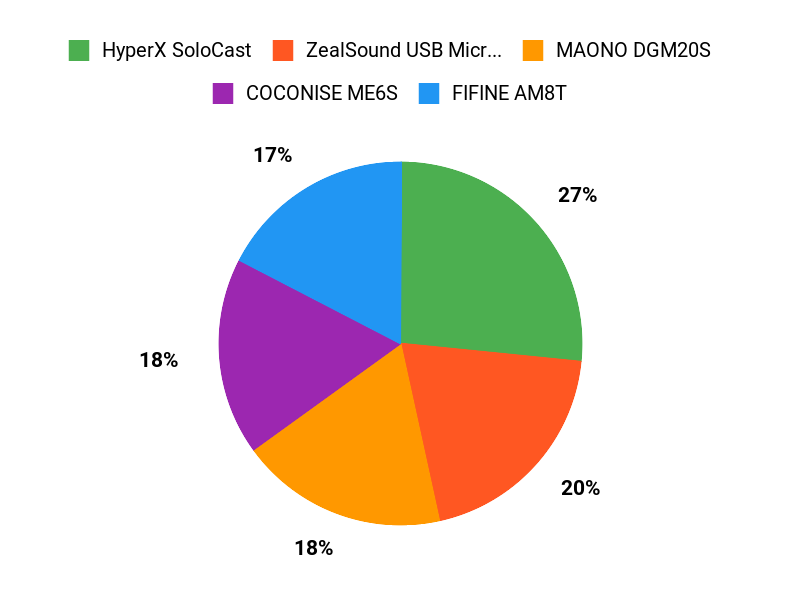
When choosing between the FIFINE AM8T, COCONISE ME6S, and the ZealSound K66, you usually prioritize clear sound and overall value — you lean toward the FIFINE for pro-level features and a sturdy build, the COCONISE when budget and plug‑and‑play simplicity matter most, and the ZealSound if you want a balanced, studio‑like tone and versatility. You also factor in compatibility with your setup, onboard controls like mute/gain, and portability so you get the right balance for streaming, voiceovers, or on‑camera recording.
Wrapping Up
Pick the mic that matches how you work and how you plan to grow. If you want an all-in-one kit with upgrade paths and useful accessories, the FIFINE AM8T is a strong overall choice. If you’re starting on a strict budget, the COCONISE gives surprisingly solid results for the price. The ZealSound is especially good if you plan to record from phones and computers; HyperX SoloCast balances performance and simplicity; MAONO adds useful noise-canceling tools and a full streaming kit.
Any of these microphones will give your voice a clearer, more professional sound so your content holds attention and feels more polished.
| Product | Image | Rating | Microphone Type | Highlights | Compatibility |
|---|---|---|---|---|---|
| FIFINE XLR/USB Gaming Microphone Set | | 4.5/5 (2,099 reviews) | Dynamic Microphone |
| Compatible with PC, Desktop, Laptop, Mixer, Mac OS, Windows |
| COCONISE Gaming Microphone |  | 4.3/5 (3,065 reviews) | Condenser Microphone |
| Compatible with PS4/5 and PC |
| ZealSound USB Microphone |  | 4.4/5 (5,163 reviews) | Condenser Microphone |
| Compatible with Mac, Windows, PS4/5, iPhone, iPad |
| HyperX SoloCast |  | 4.6/5 (19,521 reviews) | Condenser Microphone |
| Compatible with PC, PS4/5, Mac |
| MAONO Gaming USB Microphone |  | 4.5/5 (2,782 reviews) | Condenser Microphone |
| Compatible with PC, Mac, PS4, PS5 |
This Article is reader-supported. When you click through links we may earn a referral commission on qualifying purchases.